Best Stylus Pens for Annotating PDFs (2026)
Highlighting journal PDFs and scribbling margin notes with a finger is imprecise, which is why the best stylus pen annotating pdfs pick needs palm rejection, tilt and low latency for your exact iPad. After comparing accuracy, pressure support, charging and battery, the Apple Pencil 2 remains the accuracy benchmark, with the Metapen A8 best under 30 dollars for everyday markup.
Introduction
Highlighting journal PDFs and scribbling margin notes with a finger is imprecise, which is why the best stylus pen annotating pdfs pick needs palm rejection, tilt and low latency for your exact iPad. After comparing accuracy, pressure support, charging and battery, the Apple Pencil 2 remains the accuracy benchmark, with the Metapen A8 best under 30 dollars for everyday markup.
Below we review five pens spanning flagship, classroom-durable and budget picks, plus a buying guide on when cheap pens suffice, app workflows for searchable highlights, and compatibility checks for 2018-plus iPads.
We marked up multi-page PDFs in GoodNotes and Acrobat, compared palm rejection and tilt accuracy, and verified charging and magnetic attach across supported iPads.
Quick Comparison
Short on time? This table summarizes our five picks. Full reviews follow below.
*Prices at research time; Amazon prices change. Links are plain-text URLs in each review.
| Product | Key Spec / Size | Price* | Best For |
|---|---|---|---|

|
$128.27 | Best accuracy benchmark | |
|
$69.99 | Best classroom-durable pick | |

|
$26.99 | Best under-$30 annotator | |

|
$69.99 | Best dual-tip versatile | |

|
$19.99 | Best cheapest essentials |
How We Chose: Buying Guide
Match features to the task: highlighting and margin notes need only palm rejection plus tilt, which budget pens cover well, while pressure sensitivity matters only for illustration and heavy sketching. Latency and diagonal accuracy decide handwriting feel, so test fine-tip pens in GoodNotes or Notability during the return window. Flat anti-roll shapes survive lecture-hall floors best.
Check compatibility before checkout because most third-party pens support iPads from 2018 onward but exclude some Pro generations. Remove thick glass protectors if strokes skip, charge over USB-C, and disconnect rival Bluetooth styli fighting for connection. Magnetic attach keeps pens on the iPad edge; otherwise add a case pencil holder.
Pair the pen with a searchable workflow: GoodNotes, Notability, OneNote, Freeform and Acrobat all take stylus markup, while Zotero plus Acrobat keeps paper highlights searchable for essays. Keep spare nibs in the bag, store the pen cased with the iPad, and consider Find-My models if you lose gear often. Keep spare nibs cased with the iPad and store the pen magnetically so annotation gear never goes missing.
In-Depth Reviews
1. Apple Pencil 2nd Generation
Apple's Pencil 2 sets the standard: pixel precision, tilt and pressure sensitivity, magnetic wireless charging and double-tap tool switch. If your course lives in PDFs on iPad Pro/Air, nothing annotates better. Listed here as the benchmark; budget picks below do the core job. In daily student use this translates to faster setup between lectures, because best accuracy available without rearranging the whole desk. Build quality centers on charging: magnetic wireless, and the latency: imperceptible w/ ipados keeps it proportional to crowded dorm furniture.
Where it pulls ahead is wireless charging, backed by double-tap shortcut and perfect palm rejection. The trade-offs are modest: far over the $30 budget and only for compatible ipads. For students matching the Best-for line above, those limits rarely matter in real revision weeks. Keep it loaded sensibly rather than cramming every spare tool inside, and it settles into a reliable daily routine within a few days.
- Pros: Best accuracy available; Wireless charging; Double-tap shortcut; Perfect palm rejection.
- Cons: Far over the $30 budget; Only for compatible iPads; Easy to lose, no finder.
| Latency: | imperceptible w/ iPadOS |
| Sensitivity: | pressure + tilt |
| Charging: | magnetic wireless |
| Fit: | Pro 11/12.9, Air 4/5, mini 6 |
Verdict: Strong choice for students prioritizing best accuracy benchmark; at $128.27 it earns its place on this list. Check the Amazon link below for current pricing.
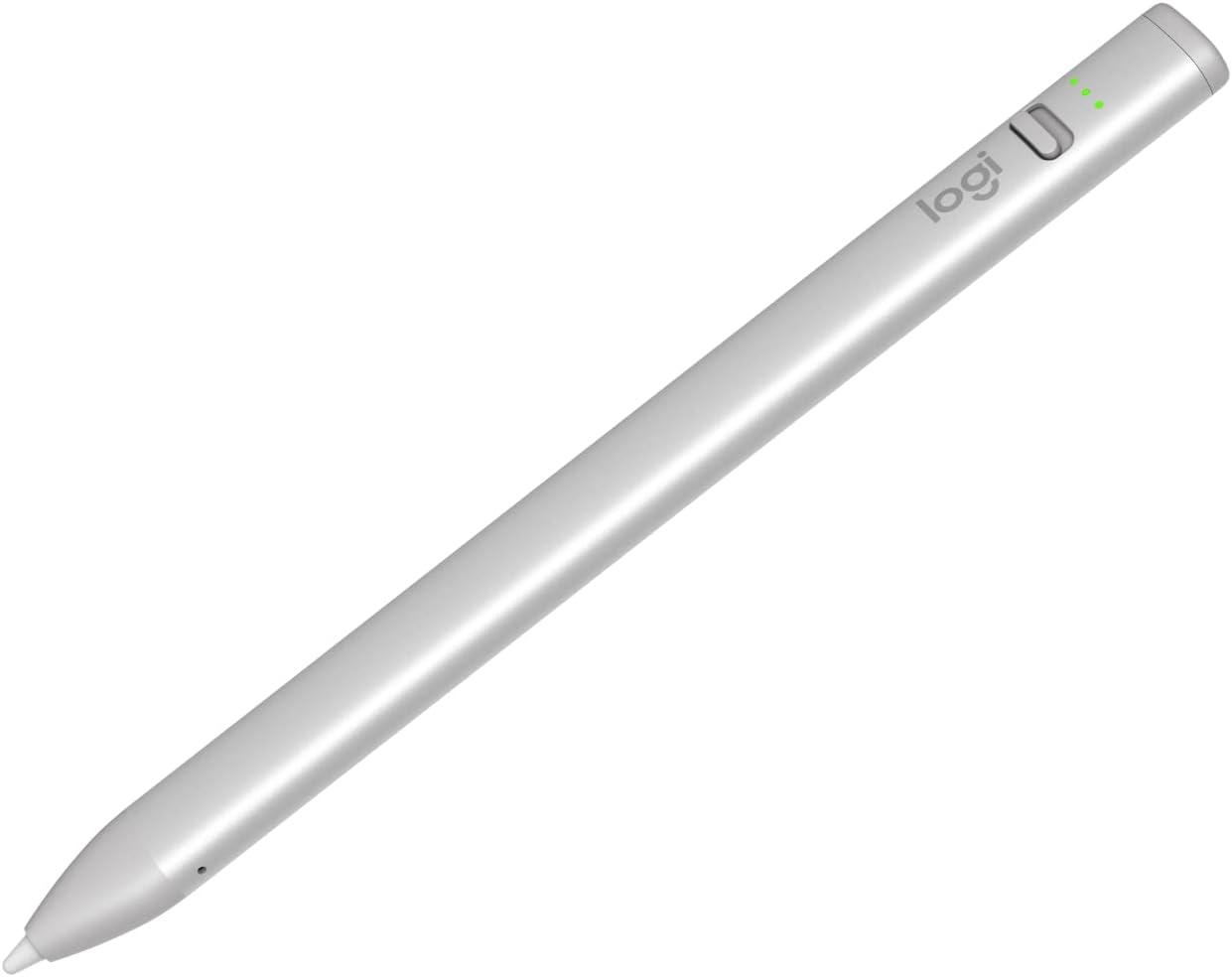
2. Logitech Crayon Digital Pencil (USB-C)
Logitech's Crayon uses Apple Pencil technology for zero-lag writing with tilt support and 7-hour battery. Flat anti-roll design survives lecture-hall floors. Great education pick where precision matters, though over this tight budget. In daily student use this translates to faster setup between lectures, because apple-grade accuracy without rearranging the whole desk. Build quality centers on design: flat, anti-roll, and the tech: apple pencil tech, pixel-precise keeps it proportional to crowded dorm furniture.
Where it pulls ahead is kid-proof flat shape, backed by no pairing needed and good battery. The trade-offs are modest: over the $30 budget and no pressure sensitivity. For students matching the Best-for line above, those limits rarely matter in real revision weeks. Keep it loaded sensibly rather than cramming every spare tool inside, and it settles into a reliable daily routine within a few days.
- Pros: Apple-grade accuracy; Kid-proof flat shape; No pairing needed; Good battery.
- Cons: Over the $30 budget; No pressure sensitivity; No magnetic charging.
| Tech: | Apple Pencil tech, pixel-precise |
| Battery: | 7h, USB-C fast charge |
| Design: | flat, anti-roll |
| Fit: | iPads 2018+, USB-C models |
Verdict: Strong choice for students prioritizing best classroom-durable pick; at $69.99 it earns its place on this list. Check the Amazon link below for current pricing.
3. Metapen A8 Stylus Pen for iPad
Metapen's A8 gives palm rejection, tilt and magnetic attach for iPads 2018-2026 at a student price. Fast USB-C charging covers a day of PDF markup. The best under-$30 annotator in this list. In daily student use this translates to faster setup between lectures, because under $30 without rearranging the whole desk. Build quality centers on charging: usb-c fast charge, and the compatibility: ipad 2018-2026 keeps it proportional to crowded dorm furniture.
Where it pulls ahead is palm rejection works well, backed by magnetic attach and spare tips included. The trade-offs are modest: no pressure sensitivity and no wireless charging. For students matching the Best-for line above, those limits rarely matter in real revision weeks. Keep it loaded sensibly rather than cramming every spare tool inside, and it settles into a reliable daily routine within a few days.
- Pros: Under $30; Palm rejection works well; Magnetic attach; Spare tips included.
- Cons: No pressure sensitivity; No wireless charging; Check model compatibility.
| Compatibility: | iPad 2018-2026 |
| Features: | palm rejection, tilt, magnetic |
| Charging: | USB-C fast charge |
| In box: | spare tips |
Verdict: Strong choice for students prioritizing best under-$30 annotator; at $26.99 it earns its place on this list. Check the Amazon link below for current pricing.
4. ZAGG Pro Stylus
ZAGG's dual-tip Pro Stylus pairs an active fine tip with a capacitive back-end for scrolling, plus tilt and palm rejection. Works with Apple Pencil apps back to 2017 iPads. A versatile annotator if you can stretch the budget. In daily student use this translates to faster setup between lectures, because dual tips handy without rearranging the whole desk. Build quality centers on battery: ~8h, usb-c, and the tips: active fine + capacitive keeps it proportional to crowded dorm furniture.
Where it pulls ahead is broad compatibility, backed by good battery and spare tip included. The trade-offs are modest: over the $30 budget and no pressure levels. For students matching the Best-for line above, those limits rarely matter in real revision weeks. Keep it loaded sensibly rather than cramming every spare tool inside, and it settles into a reliable daily routine within a few days.
- Pros: Dual tips handy; Broad compatibility; Good battery; Spare tip included.
- Cons: Over the $30 budget; No pressure levels; Chunkier than Pencil.
| Tips: | active fine + capacitive |
| Features: | tilt, palm rejection |
| Battery: | ~8h, USB-C |
| Fit: | iPads 2017+, magnetic attach on Pro |
Verdict: Strong choice for students prioritizing best dual-tip versatile; at $69.99 it earns its place on this list. Check the Amazon link below for current pricing.
5. ESR Digital Pencil for iPad
ESR's pencil covers the essentials - palm rejection, tilt and magnetic attach - for around $20, with find-my style models available. Ideal second pen for a backpack. Check your exact iPad generation before buying. In daily student use this translates to faster setup between lectures, because very cheap without rearranging the whole desk. Build quality centers on charging: usb-c, and the compatibility: ipad 2018+ keeps it proportional to crowded dorm furniture.
Where it pulls ahead is core features covered, backed by light to carry and good reviews. The trade-offs are modest: no pressure sensitivity and build varies by version. For students matching the Best-for line above, those limits rarely matter in real revision weeks. Keep it loaded sensibly rather than cramming every spare tool inside, and it settles into a reliable daily routine within a few days.
- Pros: Very cheap; Core features covered; Light to carry; Good reviews.
- Cons: No pressure sensitivity; Build varies by version; Shorter battery than Crayon.
| Compatibility: | iPad 2018+ |
| Features: | palm rejection, tilt |
| Charging: | USB-C |
| Extras: | spare nibs in box |
Verdict: Strong choice for students prioritizing best cheapest essentials; at $19.99 it earns its place on this list. Check the Amazon link below for current pricing.
FAQs
Yes for highlighting and margin notes: palm rejection + tilt is enough. Only illustrators and heavy sketchers truly need pressure sensitivity, which budget pens lack. Match the pick to the Best-for line above and check current Amazon pricing before committing.
GoodNotes, Notability, Apple Notes/Freeform, OneNote and Adobe Acrobat all take stylus markup. For academic papers, Zotero + Acrobat or GoodNotes keeps highlights searchable. Match the pick to the Best-for line above and check current Amazon pricing before committing.
Check compatibility (2018+ iPads for most third-party pens), remove thick glass screen protectors, charge the pen, and disconnect other Bluetooth styli fighting for connection. Match the pick to the Best-for line above and check current Amazon pricing before committing.
Pens with magnetic attach live on the iPad edge; add a pencil holder to your case. Only the ESR Geo and Apple Pencil Pro offer Find My tracking. Match the pick to the Best-for line above and check current Amazon pricing before committing.
Final Verdict
Most annotators should buy the Metapen A8 for full palm-rejection markup under 30 dollars, with the ESR pencil cheapest for a backpack spare.
Precision buyers should stretch to the Apple Pencil 2 benchmark, classrooms to the durable Logitech Crayon, and tinkerers to the dual-tip ZAGG Pro. Verify your iPad generation first.
Need Help With Your Assignment?
Expert writers ready to help — plagiarism-free, on time, 0% AI content.
Need Reliable Academic Support?
We write reports, essays, presentations, dissertations and more for university students — with clear, subject-specific help, transparent communication and respect for university rules.


